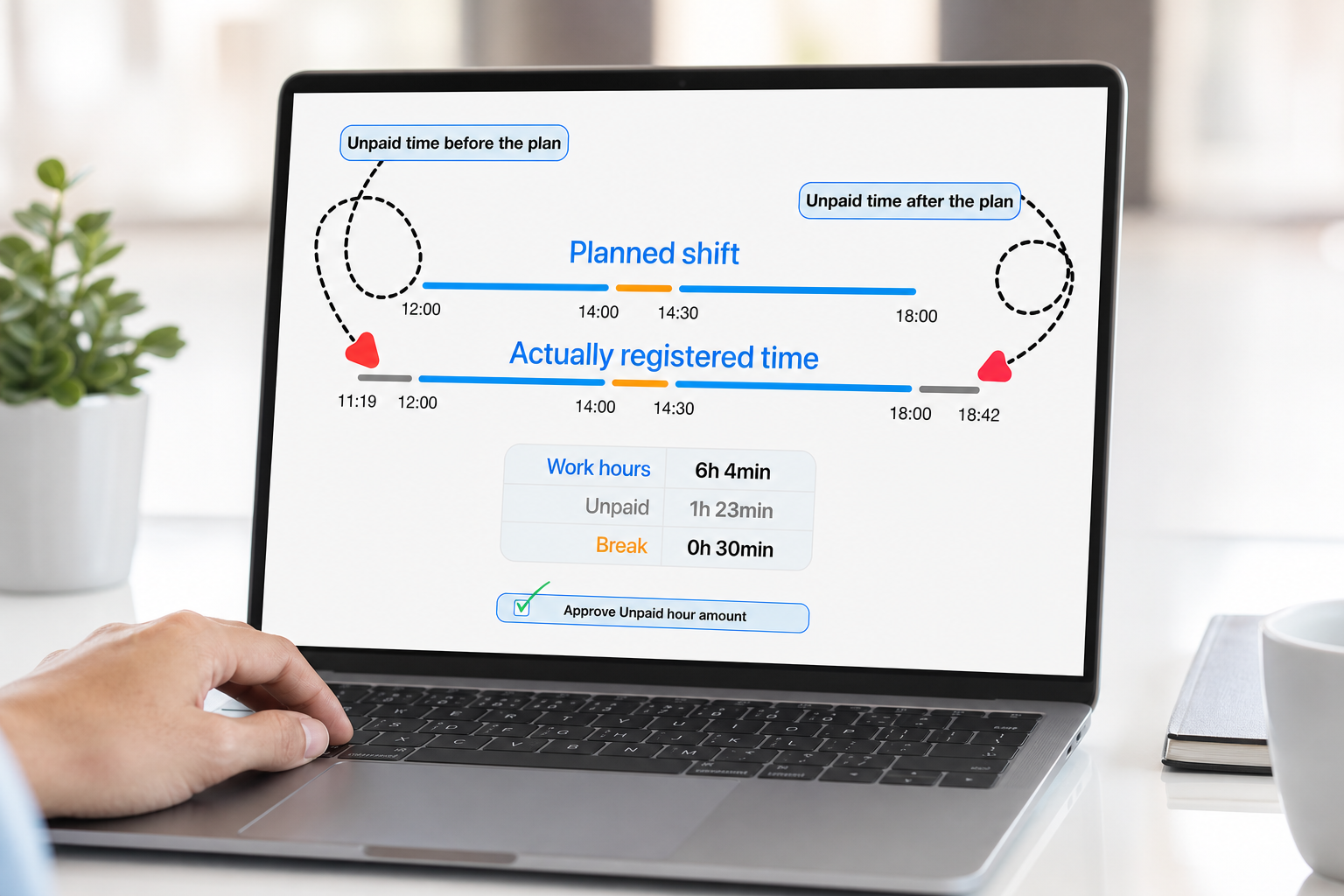
The schedule says when work should start and end. The time clock shows when employees actually clock in and out. The problem is the gap between those two records.
An employee may clock in too early before a scheduled shift. Another employee may clock out later than planned. Sometimes that extra time is real work. Sometimes it is waiting time, preparation time, late leaving, or an unauthorized attendance record that should not automatically become payable time.
Grownu helps managers control this gap with employee scheduling, employee time tracking, attendance checking in mobile and web, attendance terminals, logbook review, unpaid outside-schedule time, manager approvals, and payroll-ready timesheets.
Table of contents
- Why early clock-ins and late clock-outs create payroll problems
- The schedule is the plan. Attendance is the proof.
- Attendance checking in mobile and web
- Checking attendance by project work time
- How early clock-ins should be controlled
- How late clock-outs should be controlled
- Unpaid hours before timesheets
- Why extra time should go to the logbook first
- Manager approval before time reaches timesheets
- Preventing clock-ins too early before a shift
- RFID, PIN, mobile, and terminal attendance
- Where this control matters most
- Why spreadsheets cannot control payroll exceptions
- Conclusion
- Frequently asked questions
Why early clock-ins and late clock-outs create payroll problems
Early clock-ins and late clock-outs look small when they happen once. But when they happen every day across many employees, departments, sites, or shifts, they can create a real payroll problem.
For example, ten employees clocking in ten minutes early each day can create many extra hours by the end of the month. Late clock-outs can do the same. If those minutes automatically move into the timesheet without review, managers may pay for time that was not approved work.
The issue is not only cost. It also creates uncertainty. Managers need to know whether the time was:
- real work requested by a manager;
- preparation time before the shift;
- waiting time before work started;
- cleanup time after work ended;
- an employee forgetting to clock out;
- a valid exception that should be approved;
- an unauthorized record that should stay unpaid.
That is why early and late time should not be treated blindly. It needs rules, visibility, and approval before it becomes payroll-ready.
The schedule is the plan. Attendance is the proof.
A schedule is the manager’s plan. It says who should work, when they should start, when they should finish, and where or on what project they should work.
Attendance is the employee’s actual record. It shows when the employee clocked in, clocked out, started a task, finished a task, or recorded work time.
Good workforce management connects both records. Without this connection, managers only see raw clock times. They may not know whether those times match the schedule or whether extra time should be paid.
With Grownu, the schedule can be checked against attendance. Managers can compare planned shift time with actual clock-in and clock-out records before approving hours.
Attendance checking in mobile and web
Grownu supports attendance checking in mobile and web views. This is important because managers do not always review attendance from one office computer.
A supervisor may check attendance from a phone while walking through a warehouse. A restaurant manager may review clock-ins from the office. A cleaning manager may check site attendance from a laptop. A field manager may check mobile attendance while teams are already working.
Attendance checking helps managers see:
- who was scheduled;
- who clocked in;
- who clocked in too early;
- who clocked in late;
- who clocked out too late;
- who missed a clock-out;
- which time is inside the schedule;
- which time is outside the schedule;
- which records need approval before timesheets.
This gives managers a practical way to control attendance before payroll is prepared.
Checking attendance by project work time
Not every company works only by fixed shifts. Some teams work by project, task, client, job site, or service order. In those cases, attendance must also be checked against project work time.
For example, a construction worker may track time by job site. A cleaning employee may track time by client location. A field service employee may track time by task. A maintenance employee may record hours against a project or service job.
In this workflow, managers need to check whether the recorded work time belongs to the right project, task, client, or site. This helps answer questions such as:
- Which project received the hours?
- Was the employee working on the correct task?
- Was the time billable or non-billable?
- Should extra time be approved?
- Should the hours go to payroll, invoice records, or project profitability?
This is especially important for companies using project records and invoicing, where worked time can affect payroll, invoicing, expenses, markups, and project profitability.
How early clock-ins should be controlled
An early clock-in happens when an employee records time before the scheduled start time. Sometimes this is allowed. Sometimes it is not.
A warehouse employee may arrive early and clock in before the shift starts. A restaurant employee may clock in before the manager is ready. A cleaner may arrive at a facility before the approved night shift. A manufacturing employee may badge in before the production line is ready.
The company needs to decide what should happen to that early time. There are two common controls:
- prevent clock-ins too early before the scheduled start time;
- allow the clock-in record, but keep early time separate for manager review.
Grownu can support control on both sides. If a company does not want employees to clock in more than a selected amount of time before the schedule, that rule can help prevent early time from being created too easily.
When early time is recorded, it can be identified as outside-schedule time before it reaches the timesheet.
How late clock-outs should be controlled
A late clock-out happens when an employee records time after the scheduled end time. This may be valid if the employee was asked to stay longer. But it may also be a forgotten clock-out, slow close, waiting time, or extra time that was not approved.
Late clock-outs should be visible before payroll. Managers need to know whether the extra time was real work and whether it should be paid.
A good approval workflow separates scheduled time from extra time. The scheduled part can be easier to approve because it matches the plan. The time after the scheduled end can be reviewed separately.
This gives managers more control than simply accepting the full clock-in to clock-out duration as payable time.
Unpaid hours before timesheets
One of the most important Grownu concepts is that time outside the schedule can be identified before it becomes part of the timesheet.
For example:
- the employee is scheduled from 08:00 to 17:00;
- the employee clocks in at 07:42;
- the employee clocks out at 17:18;
- the scheduled shift is 08:00 to 17:00;
- 07:42 to 08:00 is before scheduled time;
- 17:00 to 17:18 is after scheduled time.
The early and late parts should not automatically become paid time. They can be treated as unpaid hours first and sent to the logbook for review.
Only after the manager approves those extra minutes should they move into the timesheet as payable working time.
Why extra time should go to the logbook first
The logbook gives managers a place to review exceptions before they affect payroll. This is where early clock-ins, late clock-outs, outside-schedule time, missed clock-outs, manual changes, and other attendance exceptions can be checked.
The logbook workflow helps managers avoid a common problem: every clocked minute automatically becoming a paid timesheet minute.
Instead, managers can review:
- what the schedule said;
- when the employee actually clocked in;
- when the employee actually clocked out;
- which time is inside the schedule;
- which time is before or after the schedule;
- whether the extra time was approved work;
- whether the time should remain unpaid;
- whether it should move into the timesheet.
This creates a cleaner audit trail and better payroll control.
Manager approval before time reaches timesheets
Timesheets should contain approved work time. They should not be a raw dump of every clock-in and clock-out event.
Manager approval is the step that decides whether outside-schedule time becomes payroll-ready. If the early or late time was valid, the manager can approve it. If it was not valid, the time can stay unpaid and outside the timesheet.
This approval process helps managers protect:
- payroll accuracy;
- labor cost control;
- schedule discipline;
- attendance accountability;
- project cost accuracy;
- client billing accuracy;
- manager visibility.
For project-based teams, this also matters because approved work time can flow into project records, invoices, and profitability reporting.
Preventing clock-ins too early before a shift
Some companies do not want employees to clock in too early at all. In that case, prevention is better than review.
Grownu can help control how much time before the scheduled shift an employee is allowed to clock in. For example, a company may allow clock-ins only a few minutes before the scheduled start time.
This type of rule helps reduce unnecessary early clock-in records and makes attendance easier to manage. It also helps employees understand that scheduled time matters.
A company can use this together with logbook review. Prevention reduces unnecessary records. Logbook approvals handle valid exceptions.
RFID, PIN, mobile, and terminal attendance
Attendance control depends on how employees clock in. Grownu can support different attendance workflows for different workplaces.
Fixed-location teams may use time attendance terminals. Employees can clock in from a shared terminal at the site, entrance, staff room, warehouse floor, or facility desk.
Teams that use cards, badges, or fobs can use an RFID time attendance terminal. Other teams may use PIN codes, mobile attendance, or a mobile or tablet attendance terminal.
The clock-in method can change, but the control logic should stay the same:
- capture the real clock-in and clock-out record;
- compare it with the schedule or project time;
- identify early and late time;
- send outside-schedule time to review;
- approve valid time into the timesheet;
- keep invalid time unpaid.
Where this control matters most
Early clock-in and late clock-out control is useful for any company where time records affect payroll, labor cost, project cost, or invoicing.
It is especially useful for:
- warehouses and logistics teams with shift workers and terminal clock-ins;
- restaurants where employees may arrive early or leave late around busy shifts;
- cleaning companies with facility shifts, night work, and mobile tasks;
- manufacturing teams with production shifts and fixed-site attendance;
- construction teams tracking time by job site or project;
- security teams managing post coverage, nights, weekends, and shift handovers;
- field service teams tracking work by task, client, or location.
In all these industries, the same problem appears: the scheduled work and the recorded attendance do not always match. Managers need a controlled way to decide what becomes paid time.
Why spreadsheets cannot control payroll exceptions
Spreadsheets can show planned shifts and worked hours, but they do not naturally control the approval path between attendance and timesheets.
When attendance exceptions are handled manually, managers may miss:
- early clock-ins before scheduled time;
- late clock-outs after scheduled time;
- unpaid time that should not go to payroll;
- valid extra work that should be approved;
- project time that should be invoiced;
- manual edits and corrections;
- patterns of repeated early or late attendance.
A connected system is stronger because it does not only store hours. It controls the path from schedule to attendance, from attendance to logbook, from logbook to approval, and from approval to payroll-ready timesheets.
Conclusion
Early clock-ins and late clock-outs are not only small attendance details. They can create hidden labor cost, payroll exceptions, unclear project records, and disputes about what should be paid.
The solution is to connect the schedule, attendance records, project work time, logbook review, unpaid outside-schedule time, manager approvals, and timesheets.
Grownu helps teams check attendance in mobile and web, compare clock-in records with schedules or project work time, identify early and late time before timesheets, hold unpaid hours in the logbook, and move only manager-approved time into payroll-ready timesheets.