At 6:58 AM, thirty warehouse employees are standing near the entrance waiting for a 7:00 AM shift. At another company, construction crews are arriving at several different job sites. A cleaning business has one team working permanently inside a large facility while another travels between customer locations. A restaurant needs employees to register quickly before the morning shift, and a manufacturing plant wants attendance records compared with fixed production schedules before payroll is prepared.
All of these companies need employee time tracking, but they do not necessarily need the same clock-in method.
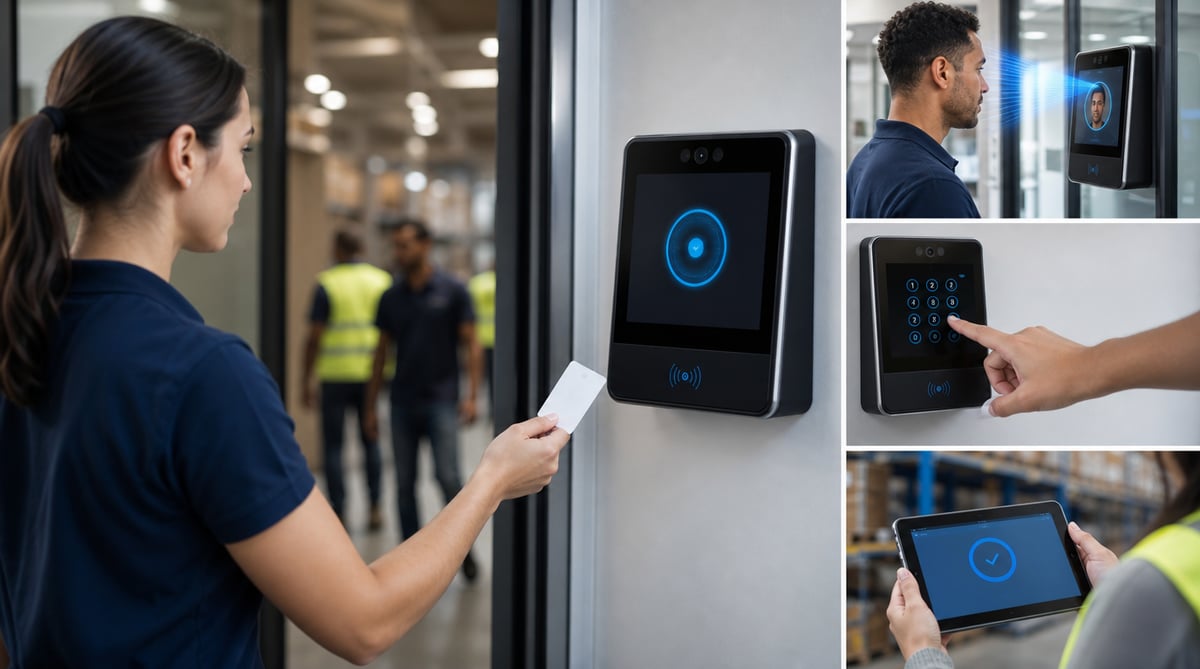
A shared RFID terminal can be extremely efficient where many employees enter through the same location. PIN registration can remove the need to issue physical cards. Photo-supported registration can give managers additional visual context. Face recognition can provide another identification method on compatible terminals. A normal Android or iOS device can become a shared workplace time clock. Employees working across distributed locations may instead register through an individual mobile application with location context where appropriate. Safety-sensitive operations may also consider a time clock terminal with a breathalyzer where appropriate.
The important decision is not simply whether a company needs a time clock. It is which employee attendance method fits the way the company actually works.
There is also a second question that matters just as much: what happens after an employee clocks in?
A registration by itself does not create a controlled payroll process. Actual time should be connected with the employee's planned schedule, reviewed for exceptions, corrected or classified where necessary and approved by a manager before it becomes a payroll-ready record.
Grownu connects employee time attendance terminals with employee time tracking, schedules and manager approvals. This makes the clock-in point part of a wider workforce workflow rather than an isolated machine at the entrance.
Table of contents
- What is an employee time clock terminal?
- How to choose the right clock-in method
- RFID time clock terminals
- PIN time clock terminals
- Photo-supported employee clock-in
- Face recognition time clock terminals
- Using an Android or iOS device as a shared terminal
- Individual mobile and GPS-supported time tracking
- Time clock terminals with a breathalyzer
- What happens when many employees start at the same time?
- What happens when employees clock in outside scheduled hours?
- From clock-in to payroll-ready timesheet
- Which time clock works best by industry?
- Implementation checklist
- Conclusion
- Frequently asked questions
What is an employee time clock terminal?
An employee time clock terminal is a shared registration point used to record when employees begin or finish work. Depending on the workplace and device, employees can identify themselves using an RFID card or tag, a personal PIN, face recognition or another supported method.
The basic concept has existed for decades. What has changed is what happens with the registration after it is created.
A traditional punch clock could tell an employer that an employee arrived at 06:54. A modern workforce management system can place that registration in context. It can know that the employee was scheduled to start at 07:00, compare planned and actual working time, show the difference to a manager and carry the approved record forward into the timesheet process.
This distinction matters because attendance hardware alone does not solve workforce management.
- Who registered?
- When did the employee register?
- What was the employee scheduled to work?
- Was the registration early, late or outside the schedule?
- Was a break required or recorded?
- Did the employee remain clocked in longer than expected?
- Does the record require manager review?
- Which hours were ultimately approved?
- What should be included in the payroll-ready timesheet?
This is why Grownu treats time attendance terminals as one part of the broader attendance process.
How to choose the right clock-in method
There is no universally best employee time clock. The correct method depends on how employees arrive, where they work, how quickly registrations need to happen and what level of identification the company requires.
Before choosing a terminal, managers should look at the physical operation rather than starting with hardware specifications.
- Do employees begin work from one fixed location?
- How many employees may register within the same five-minute period?
- Do employees wear gloves or protective equipment?
- Is the terminal installed indoors or in a demanding environment?
- Would issuing RFID cards be practical?
- Would employees prefer a cardless method?
- Is visual or biometric identification appropriate?
- Do employees work across many customer or job-site locations?
- Could an existing tablet or smartphone serve as a shared terminal?
A warehouse with 100 employees entering through one staff entrance has a different problem from a maintenance company with 20 technicians starting their days from different customer sites. The attendance method should match the operation.
RFID time clock terminals
RFID is one of the most practical registration methods for workplaces where employees arrive through a common attendance point. Each employee receives an RFID card, tag or compatible identifier, presents it to the reader and receives confirmation.
The main operational advantage is speed. If forty manufacturing employees begin at 07:00, even a small delay per registration creates a queue. RFID makes the interaction very short.
RFID time attendance terminals are particularly suitable for manufacturing plants, warehouses, distribution centers, large cleaning facilities, retail back-of-house areas, restaurants, fixed construction compounds and other workplaces with predictable entry points.
RFID does introduce card administration. Identifiers can be forgotten, lost or transferred, so the company needs a simple issuance, replacement and deactivation process. For many high-throughput workplaces, the registration speed makes that trade-off worthwhile.
PIN time clock terminals
PIN registration provides a straightforward alternative when a company does not want to issue physical RFID identifiers. Each employee uses an individual code at the shared terminal.
PIN works well for smaller and medium-sized teams, shared tablets and workplaces where registration speed remains acceptable. The obvious weakness is that a PIN is knowledge rather than a physical or biometric identifier and can potentially be shared.
Companies wanting additional verification can combine the workflow with photo capture or consider another identification method where appropriate.
Photo-supported employee clock-in
Photo-supported clock-in can provide managers with additional context when an employee registers attendance. Instead of storing only identity and timestamp, the attendance event can include a photo captured during registration.
A photo and face recognition are not the same thing. A photo can be attached to an attendance record for manager review. Face recognition attempts to identify or verify a person using biometric characteristics.
Where employee images are processed, organizations should define why they are collected, who can access them, how long they are retained and which privacy requirements apply.
Face recognition time clock terminals
Face recognition provides another possible identification method for a shared employee attendance terminal. Instead of presenting an RFID card or entering a PIN, an employee can use a compatible terminal that supports identification or verification based on a previously enrolled biometric template.
Operationally, this can reduce reliance on cards and codes and can be relevant to manufacturing facilities, warehouses, logistics operations and other shift-based workplaces.
Face recognition involves biometric processing and therefore requires additional consideration around enrollment, templates, access, retention, security and the legal basis for processing employee biometric data. Organizations should assess applicable requirements and whether biometric identification is necessary and proportionate before deployment.
Grownu's broader time attendance terminal solution can include face recognition as one possible terminal identification method while keeping the attendance record connected with schedules, manager review and approved working time.
Using an Android or iOS device as a shared time clock terminal
Dedicated attendance hardware is not always necessary. A company may already have a suitable Android or iOS phone or tablet at the workplace. The device can become a shared employee registration point.
This is attractive for small branches, temporary workplaces, customer facilities, construction site offices, restaurants, retail locations and businesses testing digital attendance before investing in dedicated hardware.
With a mobile app time attendance terminal, employees can use a common device and the resulting records flow into the same workforce process as dedicated terminal registrations.
Individual mobile and GPS-supported time tracking
A shared terminal makes sense when employees pass through the same location. It makes less sense when employees begin directly at customer sites, construction projects or other distributed locations.
In those cases, individual mobile time tracking may be more appropriate. Where configured under company policy and applicable requirements, location information can provide context around the registration.
This model is relevant for construction, mobile cleaning, maintenance, facility services, field service, security and distributed agricultural teams.
A company does not need one registration method everywhere. It can have RFID at a warehouse, a tablet at a temporary site and mobile registration for field employees while keeping all records in the same employee time tracking workflow.
Time clock terminals with a breathalyzer
Some safety-sensitive workplaces may have additional requirements around fitness for work and alcohol testing. A time clock terminal with a breathalyzer can combine attendance registration with an alcohol testing workflow.
Potential environments may include certain construction, industrial, logistics and manufacturing operations where such a process is appropriate.
This is not a universal attendance feature. Alcohol testing can involve significant employment, privacy, health-data and legal considerations. Organizations should establish the appropriate basis, internal procedure, access controls and response process before using such functionality.
What happens when many employees start at the same time?
One of the most overlooked questions when selecting a time clock is throughput.
Imagine a warehouse where 60 employees begin at 07:00. If each registration takes ten seconds, a single terminal could theoretically require ten minutes to process everyone if they arrive at once. In reality, somebody enters a wrong PIN, another employee asks a question and the queue grows.
This can distort attendance records: an employee who arrived before 07:00 might receive a 07:04 timestamp simply because they were waiting in line.
High-volume shift changes favor methods with very short interaction times and, where necessary, multiple registration points. Managers should consider employee volume, registration speed, physical approach to the terminal, protective equipment, connectivity, success confirmation and duplicate-registration handling.
RFID can be particularly strong in this scenario because the employee interaction is minimal.
What happens when employees clock in outside scheduled hours?
This is where an attendance system becomes a workforce management system.
Suppose an employee is scheduled from 07:00 to 15:00, registers at 06:42 and clocks out at 15:17.
The raw attendance record contains 35 minutes outside the planned schedule. A stronger workflow preserves both facts: the employee was planned for 07:00–15:00 and actually registered 06:42–15:17.
The difference becomes an exception for review rather than disappearing.
Why outside-schedule time should remain visible
An early clock-in does not tell the manager why the employee was early. The employee may have started authorized work, arrived early without working, been asked by a supervisor to prepare something, or worked under a schedule change that was not yet recorded.
The same applies to a late clock-out. The employee may have completed additional authorized work, responded to an operational problem or simply forgotten to register at the correct time.
Grownu can separate time outside the schedule for manager review instead of silently assuming what happened.
Outside schedule does not automatically mean legally unpaid
A system can identify and separate time that falls outside the planned schedule, and a company may have policies and approval rules for dealing with it. However, merely being outside the published schedule does not automatically make working time legally unpaid.
Whether particular time must be paid depends on the circumstances, applicable employment law, contracts, collective agreements and company policies.
The software's role is to preserve the planned start and end, actual registration, time inside the schedule, time outside the schedule, manager decision or correction and the approved hours sent forward for payroll preparation.
This is particularly useful in warehouses, manufacturing and other fixed-shift environments where employees may routinely arrive before scheduled start or remain registered after planned finish.
From clock-in to payroll-ready timesheet
The terminal should be the beginning of the attendance workflow, not the end.
- The employee receives a planned schedule.
- The employee registers using RFID, PIN, face recognition, a mobile terminal or another configured method.
- The actual timestamp is stored.
- The employee clocks out when work ends.
- Actual attendance is compared with the planned schedule.
- Early starts, late finishes, missing registrations and other exceptions are identified.
- Time outside the schedule remains visible for review.
- The manager reviews exceptions and makes the appropriate approval or correction.
- Approved hours become payroll-ready timesheet records.
This is stronger than exporting raw terminal punches directly into payroll. Payroll should not have to decide why somebody clocked in 18 minutes early; that is an operational question for the responsible manager.
The workflow can connect with employee scheduling so planned and actual working time are reviewed together.
Which time clock works best by industry?
Manufacturing
Manufacturing is one of the strongest use cases for shared attendance terminals. Employees often work fixed or rotating shifts, enter through predictable locations and start in groups. RFID provides fast registration; PIN can suit smaller teams; compatible face recognition can offer a cardless method where relevant biometric requirements have been addressed.
The bigger benefit comes after registration: planned shifts can be compared with actual attendance so managers can review early clock-ins, late clock-outs, missing registrations and overtime before payroll.
Warehouses and logistics
Warehouses and logistics frequently combine fixed shifts, common entrances and large groups starting together. RFID is particularly suitable where dozens of employees need to register within a short period.
Warehouses also illustrate why outside-schedule time matters. Employees may arrive early and register before their scheduled shift, while others may forget to clock out immediately after work. Actual registration should remain preserved while outside-schedule time is separated for manager review before payroll.
Construction
Construction requires flexibility. A larger project may use a shared tablet, RFID/PIN terminal or common attendance point. Smaller crews moving between sites may be better served by individual mobile registration.
Where appropriate, location context can help managers understand a mobile registration. Safety-sensitive operations may also evaluate a breathalyzer time clock terminal where there is a suitable legal and operational basis.
Cleaning and facility services
Cleaning companies demonstrate why one company may need two attendance models. A fixed facility with twenty cleaners can use a shared terminal. A mobile cleaning team visiting several customer locations is better suited to mobile time tracking. Both models can produce attendance records inside the same workforce system.
The same principle applies to facility service companies, where some employees may work permanently at a customer facility while other teams move between locations.
Restaurants and hospitality
Restaurants often have clear staff entry points and shift-based schedules. A shared tablet, PIN terminal or RFID terminal can provide a simple process for kitchen, service and support teams. Comparing registrations with schedules helps managers identify late arrivals, early clock-ins and unexpectedly long shifts.
Retail
Retail employees usually work from fixed store locations, making shared terminals practical. PIN, RFID or other supported methods can be selected according to store size. Multi-location retailers can use the same attendance workflow across stores while retaining centralized reporting.
Healthcare and care facilities
Healthcare and care facilities can use shared attendance points for employees beginning work at a common location. Mobile healthcare teams working between client locations may instead require individual mobile registration. Attendance technology should remain focused on workforce administration rather than clinical records.
Security services
Security services can include both fixed posts and mobile personnel. A permanent staffed location may use a shared terminal, while employees working across changing posts may need mobile registration.
Agriculture
Agriculture can include fixed processing facilities and distributed outdoor work. Shared terminals can work at common attendance points, while mobile registration may be more practical for distributed crews. Environmental conditions should influence hardware selection where devices face dust, moisture or temperature changes.
Field service and maintenance
Field service technicians often start directly from home, a vehicle or the first customer location. Individual mobile time tracking is usually a better fit, while workshop or depot employees within the same company can still use a shared terminal.
For maintenance teams, the same hybrid approach can work well: employees based at a workshop or facility can use a shared attendance terminal, while technicians working across customer locations can register time through the mobile workflow.
Implementation checklist
- Define which employees use each registration method.
- Choose shared terminal locations.
- Define employee identification and RFID replacement procedures.
- Define biometric enrollment and governance if face recognition is used.
- Define what information is collected and why.
- Set retention and access rules for photos or biometric-related data where applicable.
- Define what happens during device or connectivity problems.
- Make successful registration clear to employees.
- Define how forgotten clock-ins and clock-outs are corrected.
- Assign responsibility for reviewing outside-schedule time.
- Define who can approve or modify records.
- Define when approved records become payroll-ready.
Test the terminal during the busiest real-world period, not only with one administrator. If forty employees start at 07:00, test a realistic shift change. If employees wear gloves, test with gloves. If connectivity can be weak, define what employees should see and do when the connection is unavailable.
Conclusion
The best employee time clock is the registration method that fits the way employees actually arrive, work and leave.
RFID can be excellent for high-volume shift changes. PIN provides a straightforward cardless option. Photo-supported registration can add visual context. Face recognition can offer biometric identification on compatible terminals where its use is appropriate. Android and iOS devices can become shared workplace terminals. Mobile time tracking can serve distributed employees, while specialized breathalyzer terminals can support particular safety-sensitive workflows where appropriate.
Companies do not need to force every worker into the same method. A warehouse can use RFID, a temporary construction site can use a shared tablet and mobile technicians can register individually while all records flow into the same attendance process.
Most importantly, clock-in should not be treated as the final record.
Grownu connects time attendance terminals, employee time tracking and employee scheduling so actual registrations can be compared with planned work. Early clock-ins, late clock-outs and other outside-schedule time remain visible for manager review rather than disappearing into a raw timesheet.
After exceptions are reviewed and appropriate hours are approved, the result is a cleaner payroll-ready attendance record.